Blog
The PDF Is Part of the Public Service
Lessons from Kacy Irby on document discovery, source-level PDF remediation, complex-table reading order, and human review in accessibility workflows.

An accessible website can still lead someone to an inaccessible document.
A resident may navigate a city website with a screen reader, find a permit form, download it, and hit a dead end. The navigation worked. The form did not.
I recently spoke with Kacy Irby, COO at Foresera, about document accessibility and the work required to make large collections of PDFs useful with assistive technology.
The conversation changed how I think about the problem. PDF remediation is not simply a task applied to a file. It is an operating workflow that begins with discovery, uses automation where the evidence is strong, and keeps human review close to the complex cases.
Start with the actual document inventory
Teams often know their main website. They may not know the size of the document collection behind it.
Kacy described one organization that expected roughly 250,000 documents. Discovery found 1.6 million. That difference changes staffing, budget, and the order of work.
The first useful question is not “Which PDF should we fix first?” It is “Which documents exist, where are they published, and which ones matter?”
That inventory step can identify several categories:
- Current public documents that people use often
- Older material that requires a retention or archival decision
- Duplicates spread across a primary site and subdomains
- Complex files that need early human attention
Deduplication has a practical benefit. If the same PDF appears in several locations, a team should understand that relationship before spending effort repairing each copy. Fixing the source document can address the copies that depend on it.
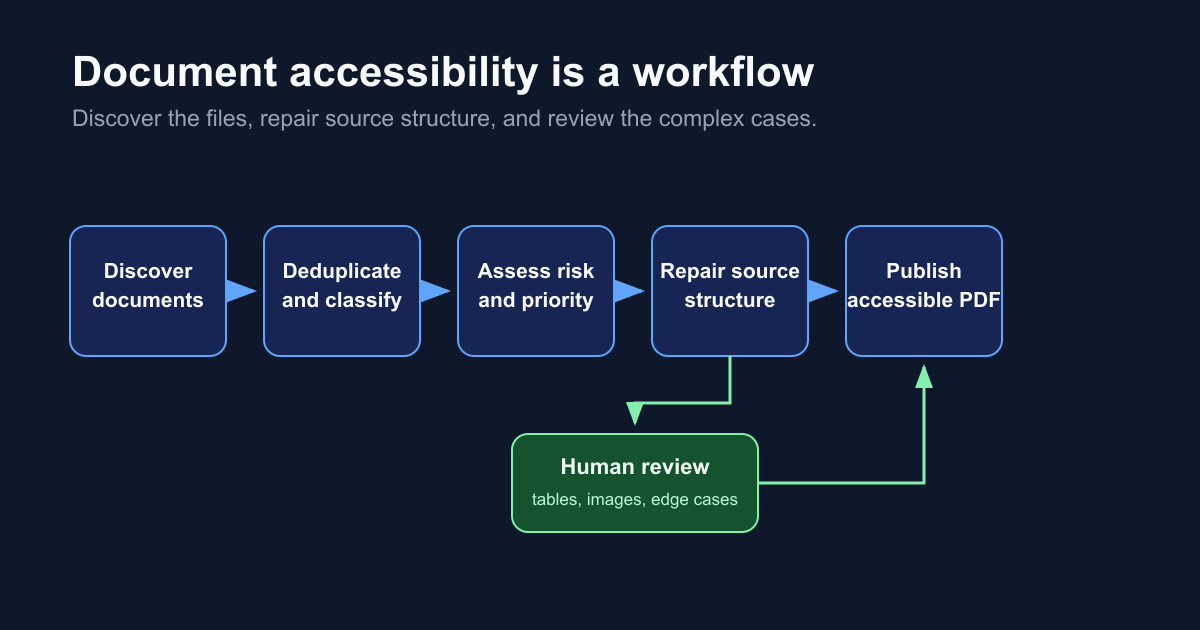
This is a familiar engineering pattern. Build an inventory, classify the work, remove duplicate effort, then apply the expensive review where it has the most value.
A website overlay does not repair the file
Kacy made an important distinction between a website layer and the document itself.
An accessibility feature that helps someone navigate a web page may not make a downloaded PDF usable in a screen reader. The file can travel through email, a records portal, a browser download, or a shared drive. Its accessibility properties need to travel with it.
That leads to a stronger standard for document remediation: repair the source-level document and produce a file that can stand on its own with assistive technology.
For teams facing a backlog of inaccessible PDFs, Foresera’s tool brings together document discovery, risk assessment, and source-level repair, with complex material routed for human review. To learn how that workflow could fit your document collection, visit Foresera.com or reach out to Kacy directly.
For public agencies, this shows up in everyday interactions. A building permit, meeting agenda, benefit form, or public record can be the real service a resident needs. The web page is only the route to that service.
Reading order is a correctness problem
The hardest engineering detail Kacy discussed was reading order in complex tables.
A person can look at a five-column table and infer the headers, rows, and relationships almost instantly. A screen reader needs the document structure to make those relationships explicit. It has to move through the headers and cells in an order that preserves the meaning of the table.
That is not a cosmetic issue. Incorrect order changes what a user hears and can make a valid-looking form or report unusable.
Kacy described a workflow that uses code-based schema maps, document templates, and checks for known patterns. Those methods give the system a dependable path through repeated document types. They also make it easier to identify material that falls outside the expected structure.
For AI product teams, this is a helpful reminder: visual similarity is not enough. The system needs a representation that supports the real task, then a way to verify the result.
Human review belongs at the decision boundary
Automation can find files, assess patterns, assign risk, and handle repetitive structure. Kacy emphasized human review for complex tables and detailed images, where a wrong interpretation can leave a document inaccessible.
That approach gives human review a clear job. It is not a vague approval step at the end of a pipeline. It is a response to evidence that a case is complex enough to deserve careful inspection.
This pattern works well in other AI-assisted workflows too:
- Automate repeated work with known structure.
- Record the checks that support the result.
- Flag uncertainty and edge cases for a qualified reviewer.
- Feed what the team learns back into templates, tests, and operating procedures.
The goal is a workflow where people spend their attention on judgment, rather than manually repeating the work that software can establish reliably.
Make accessibility part of publishing
Kacy’s strongest operational point was that accessibility should not arrive as a final checkpoint. A document should be accessible when the team considers it complete.
That means building accessibility into the content lifecycle:
- Use accessible source templates for recurring forms and reports.
- Test document structure before publishing.
- Track changes to templates and high-use files.
- Maintain an inventory so new documents do not disappear into another backlog.
- Keep a path for complex files that require review.
The result is more than compliance preparation. It is a better publishing system for the people who depend on the documents.
My biggest takeaway from Kacy was simple: document accessibility is not a layer added around a website. It is a property of the file and a responsibility of the workflow that creates it.